Timesheet software with daily recap and approvals
Timesheet software records the hours each person spent on each project, so a manager can approve them and report on them. PeopleMuster calls its timesheet the daily recap, and time logging opens the same screen. Someone finishes work, says where the hours went, and the sheet moves into a queue for approval.
An employee logs against projects, by day. Their own view totals the week, compares it against the expected forty hours, and gives a completion percentage so they can see what is missing before their manager does.
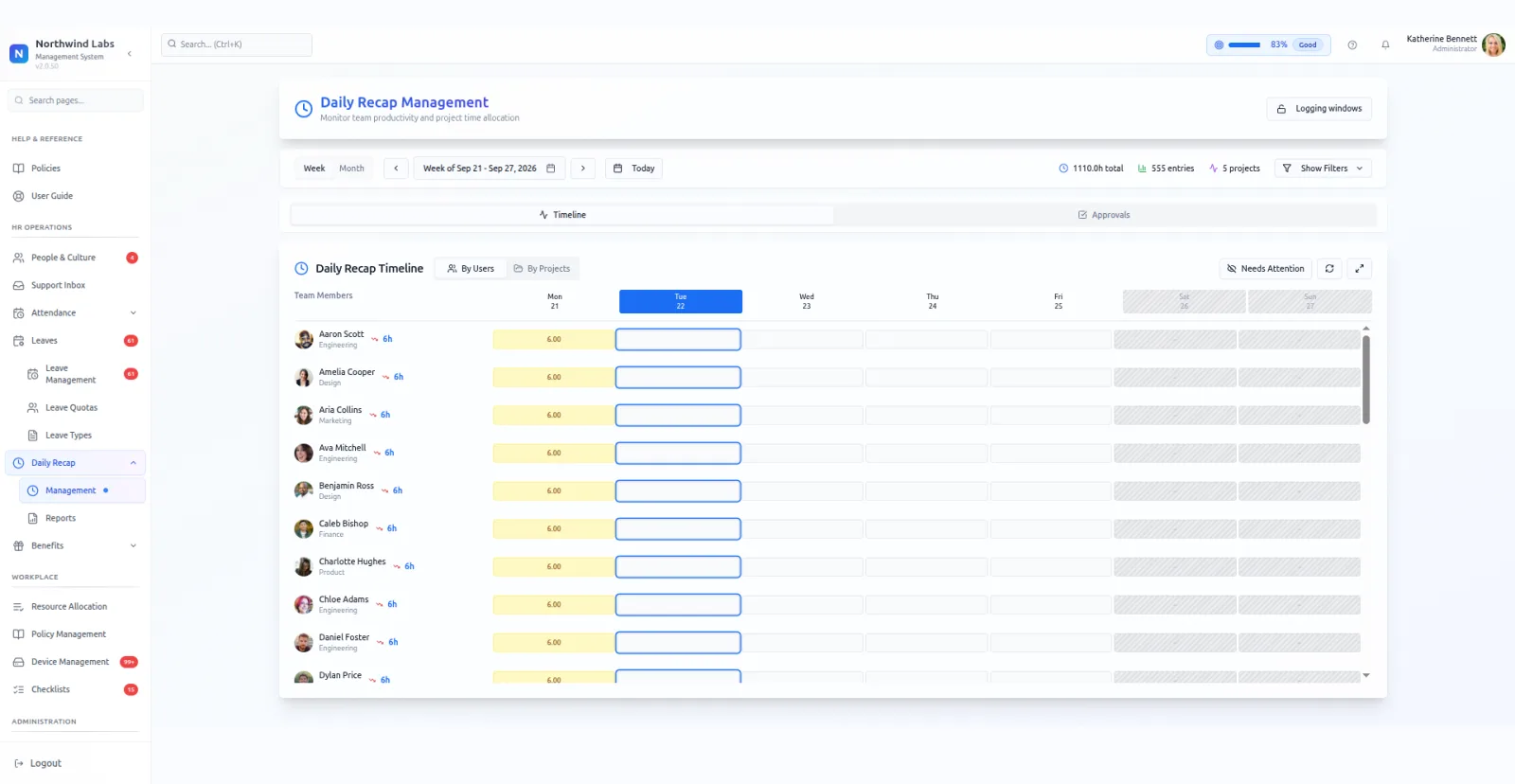
Managers get a grid: people down the side, weekdays across, hours in each cell. Gaps are obvious at a glance. Views regroup the same data by user or by project, and a needs-attention view collects the sheets that are short or missing.
Sheets have a lifecycle. Draft becomes submitted, submitted becomes approved. The change is recorded in the audit trail with the old value and the new one, which settles the question of when something was actually sent.
Approvals stack up in a queue. Clearing them weekly is the habit that keeps the utilisation report worth reading, because an unapproved sheet is only a claim.
The logging window is the setting that decides how this module behaves in practice. Set it short and people log the same day, which is when they still remember. Set it long and you collect a month of reconstructed guesses. The running instance allows five working days.
An insights tab gives each person their own pattern rather than the team's. Where their hours went, which projects took more than expected, and how the week compares with the last. Most people look at it once and then adjust what they log.
Grouping by project rather than by person answers the other question managers ask. Not who is short, but where the month actually went. Same hours, different axis, and the two views rarely tell the same story.
What it does
- Log by project, by day
- Week and month views, plus a weekday strip showing what is still blank.
- Draft, submitted, approved
- A real status lifecycle, with every transition written to the audit trail.
- Configurable logging window
- You set how many working days back somebody may still log. Late entries stop being infinite.
- Team grid and approvals
- Person by weekday, hours per cell, with a queue for everything awaiting sign-off.
- Needs-attention view
- Short and missing sheets collected in one list, rather than found by scrolling.
What it needs before it works
- Projects created first. Hours log against a project, so an empty project list makes the screen useless.
- Approvers assigned, or sheets pile up in draft.
- A decision on your logging window: how many working days back a person may still fill in.
Questions people ask
What should timesheet software show a manager?
Who logged what, where the gaps are, and what still needs approval. PeopleMuster gives managers a person-by-weekday grid, an approvals queue and a needs-attention view for short or missing sheets. Approved hours then feed the utilisation report.
What is the difference between daily recap and time logging?
Nothing. Two names for the same screen. The older route redirects to the newer one, and both open the same logging view.
How far back can someone log time?
As far back as your logging window allows. The running instance is set to five working days, and an administrator can raise or lower that.
Can I tell billable projects from internal ones?
Yes. Each project is flagged billable or non-billable, and fixed-price or hourly. The capacity grid filters on the billable flag.
What does the expected hours figure compare against?
A standard working week, shown beside the total a person has logged, with a completion percentage. It is there so somebody notices a gap before their manager has to raise it.
Is a submitted sheet locked?
Submission moves the sheet into the approval queue and the change is recorded with its old and new status. Treat submitted as the point where a sheet becomes somebody else's to act on.