$3per person, per month · all 26 modules · 14 days free
HR and Project Delivery in One System
PeopleMuster is the HR and operations system for companies that run on people and projects at the same time. Attendance, leave and timesheets share one database with your client projects and the capacity plan.
Built for agencies, software houses and consultancies, where the person on leave on Thursday is also the person booked on a client project that day.
14 days free, no card required · No setup fee · Your own database
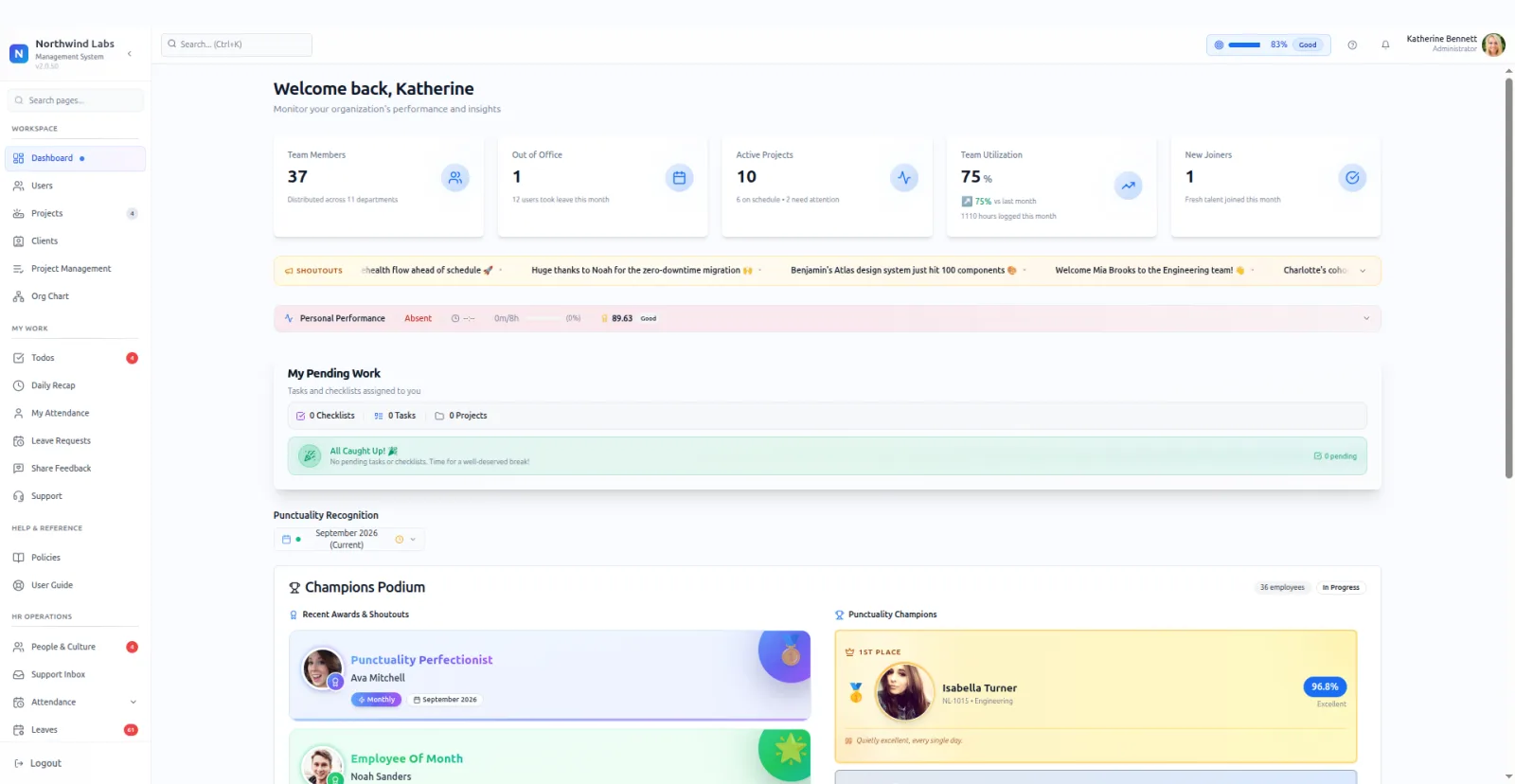
The real product, shown on a demo company.
One system instead of an HR tool and a planner
Service teams usually buy HR software and a separate planning tool, then reconcile the two by hand. PeopleMuster does both jobs from one database.
One record for each person
Attendance, leave, timesheets and project assignments all hang off the same employee. Nobody retypes a new joiner into a second tool.
Leave lands on the plan
Approve someone's leave and those days empty on the capacity plan straight away. No sync to wait for, and no two calendars to reconcile.
$3 for all of it
BambooHR Core lists at $10 per employee and Float Starter at $7 per person, so an HR tool plus a planner is two bills. PeopleMuster is $3 per person, per month, with every module included.
From check-in to utilisation, entered once
Each step reads what the one before it recorded, so nothing is typed into a second tool.
- 01
Check in once
At a fingerprint terminal or in the browser, inside the person's shift window. A forgotten punch becomes a correction request rather than an argument.
Attendance
- 02
Measured against their shift
Late minutes count from that person's own start time, so someone on a staggered shift is not marked late for keeping to it.
Shifts
- 03
People log the day against projects
A short daily entry per project instead of a blank grid on Friday afternoon, with a submit-and-approve step for managers.
Timesheets
- 04
Utilisation is calculated for you
From those approved hours: by project, by department, week over week, posted to Slack on a schedule so nobody has to ask.
Utilisation
- 05
Every change keeps its trail
Field-level before and after, with who approved it. You will want this the first time a figure is disputed.
Audit
Inside the product
Three screens your managers open every morning
Real screens from the product, shown on a demo company.
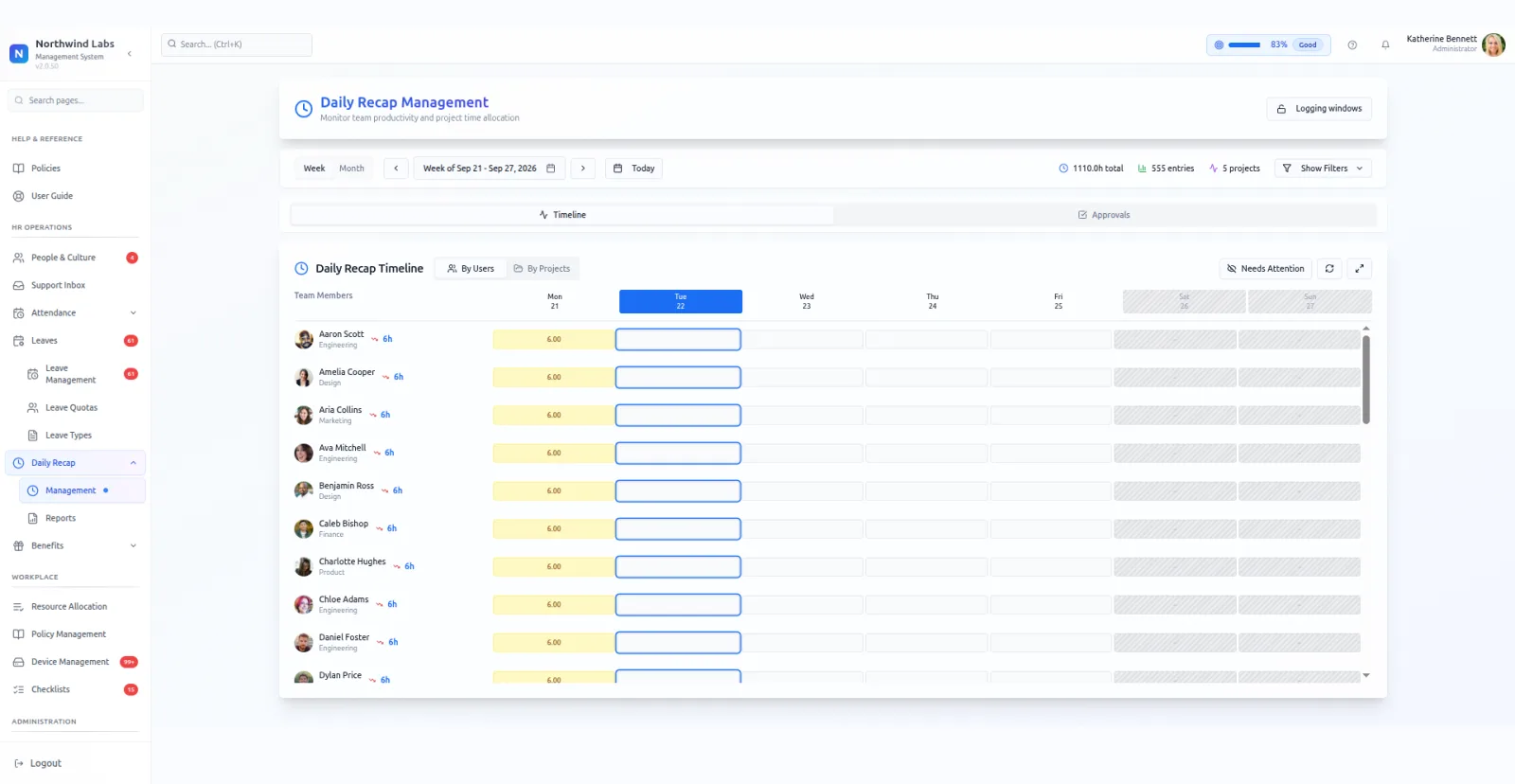
Timesheets
A week of the team, in one grid
Every person down the side, every weekday across the top, hours in the cells. Gaps are visible at a glance rather than found at the end of the month.
- Approvals are a queue. Submitted sheets land in one place, and a draft that never got submitted is not silently counted.
- The logging window is configurable. People can backfill a set number of working days and no further, so the week stops moving.
- Group by person or by project, and read the same hours as utilisation by department.
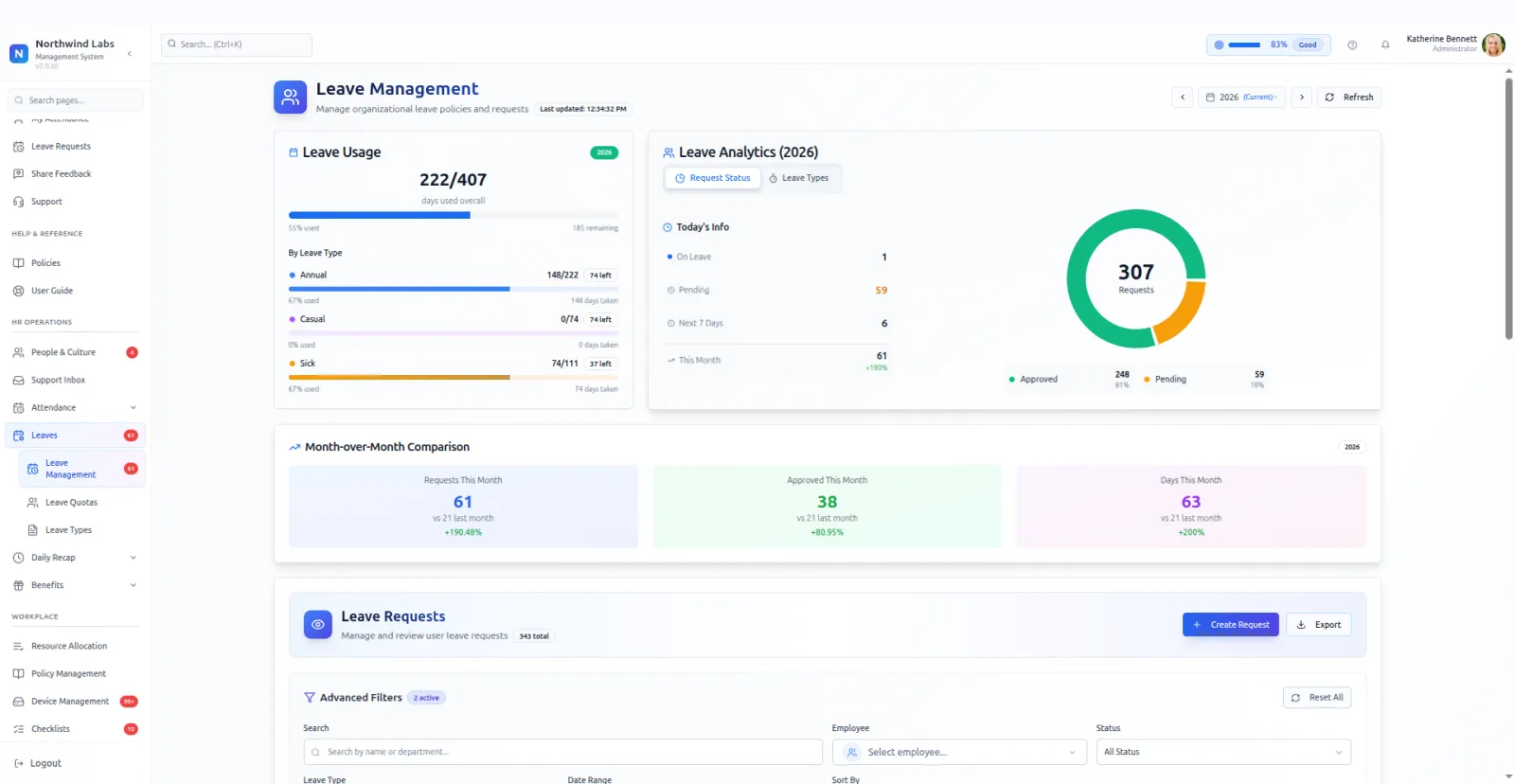
Leave
Every balance, without opening a spreadsheet
Days used against the yearly allocation, split by leave type. Who is off today, what is waiting for approval, and how this month compares to the last one.
- Quotas are per type, per year. Annual, casual, sick and the rest each carry their own allowance, and paid, unpaid and encashable are flags on the type.
- Pending requests are counted separately, so a balance that looks healthy today does not hide four approvals waiting.
- It reaches the capacity plan. Approve leave here and those days empty on the team's week. One database, not two calendars.
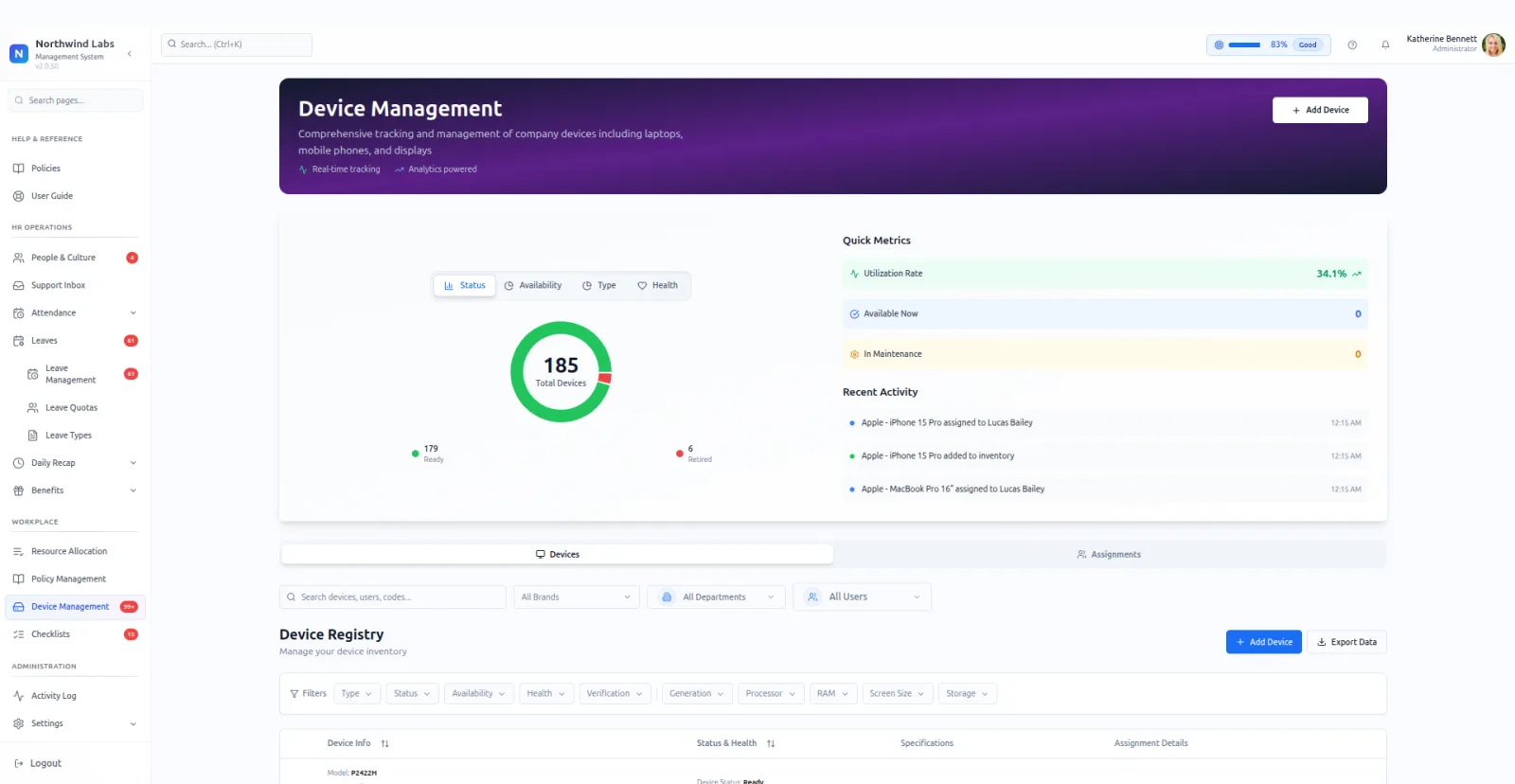
Devices
Who has the laptop, and what state it is in
An asset register with the serial, the specification, the health grade and who is holding it. The question that usually gets answered by walking round the office.
- Filter down to processor, memory, storage or screen size, so a replacement is matched rather than guessed.
- It joins the leaver's checklist. The register and the offboarding process are the same system, so the laptop is on the list before the last day.
26
Modules, each switchable per company
64
Permissions behind the role model
31
Tenant settings, including how project health is scored
$3
Per person, per month, every module included
Counts of what is in the product, taken from the running system in September 2026.
What the HR software covers, module by module
PeopleMuster ships 26 modules, and you switch each one on per company. A studio that never touches client projects turns those off and gets a leaner system from the same product, with nothing extra in your team's navigation.
Attendance
Fingerprint terminal or browser check-in, with on-time rate, late minutes and punch corrections.
Shifts
Named shifts with time windows, assigned per person, with assignment history.
Leave
Quota-based leave with per-type allocations, approvals and year-on-year usage analytics.
Holidays
A company holiday calendar that attendance respects.
Daily recap and timesheets
Daily time logging by project, with approvals and a configurable logging window.
Utilization reporting
Utilization, hours by project and department, and week-over-week trend, postable to Slack.
One price for the whole HR system: $3 per person
PeopleMuster costs $3 per person, per month, with every module included. That's the whole bill, with no base fee, no platform fee and no setup fee.
14 days free, no card
Every new customer gets 14 days free before the $3 starts. You run the trial on your own team's attendance, leave and project hours, with every module available.
No seat minimum
A team of any size pays $3 per person from the first person. You're billed monthly, you can cancel any time, and there is no long-term contract.
$30 a year on annual billing
Pay $30 per person per year and you get two months free. Every module is included on annual billing too.
Set up with you
We load your people, leave types and projects with you during setup, as part of the subscription. You can also bring them in from a CSV file yourself.
Your data stays yours
Employee records deserve a clear answer about where they live and who can see them.
Your own database
Each company runs on its own database, in its own account, in the region it chooses. Not shared rows in one big table.
Fingerprints stay on the terminal
The fingerprint terminal matches the thumb itself. PeopleMuster receives only who punched and when.
No passwords to leak
People sign in with a one-time code sent to their work email, behind bot protection.
Every change has a trail
Field-level before and after values, with who changed what, and 64 permissions across five built-in roles plus your own.
What is PeopleMuster?
PeopleMuster is the HR and operations system for companies that run on people and projects at the same time. Attendance, leave, timesheets, capacity planning and client project delivery share one database. It costs $3 per person, per month, with every module included.
What does PeopleMuster's HR software include?
Attendance from a fingerprint terminal or the browser, shifts, leave with a quota per type, holidays and daily timesheets. On the delivery side you get projects, clients, resource allocation and utilisation by project and department. The directory, org chart, device register, policies and support desk sit on the same employee record.
How much does PeopleMuster cost?
$3 per person, per month, with every module included and no tiers. Annual billing is $30 per person per year, which is two months free. Your first 14 days are free, with no card required.
How do we move our people across from another HR tool?
We load your people, leave types and projects with you during setup, at no extra fee. If you'd rather do it yourself, import people, leave balances and projects from a CSV file.
Can we switch a module off once we have started using it?
Yes. The data stays where it is and the module leaves your team's navigation. Switch it back on later and the history is still there.
Do we need biometric hardware?
No. An admin can turn on browser check-in, so people check in from the web inside their shift window. If you already have a ZKTeco fingerprint terminal, PeopleMuster reads it too.
Where does our data live?
In your company's own database, in your own account, in the region you pick when we set it up. Nobody else's data sits beside it.
See PeopleMuster on your own team
Book a demo. Tell us how your people clock in and what you argue about at month end, and we will show you the modules that fix it, set up with your structure.