Leave management system with quotas and approvals
A leave management system tracks who asked for time off, who approved it, and how many days each person has left. In PeopleMuster, leave runs on quotas. Every type gets a number of days for the year, and every employee gets an allocation against it. Your balance is arithmetic anybody can check.
Define the types your company uses. Each carries an annual quota and two flags: whether the days are paid, and whether unused days can be cashed out. A typical set has annual, casual, sick, unpaid and a couple of life-event types.
Employees request. Approvers see a queue with pending items pulled to the front. The requester watches the status move without asking anyone, which is most of the value on a busy month.
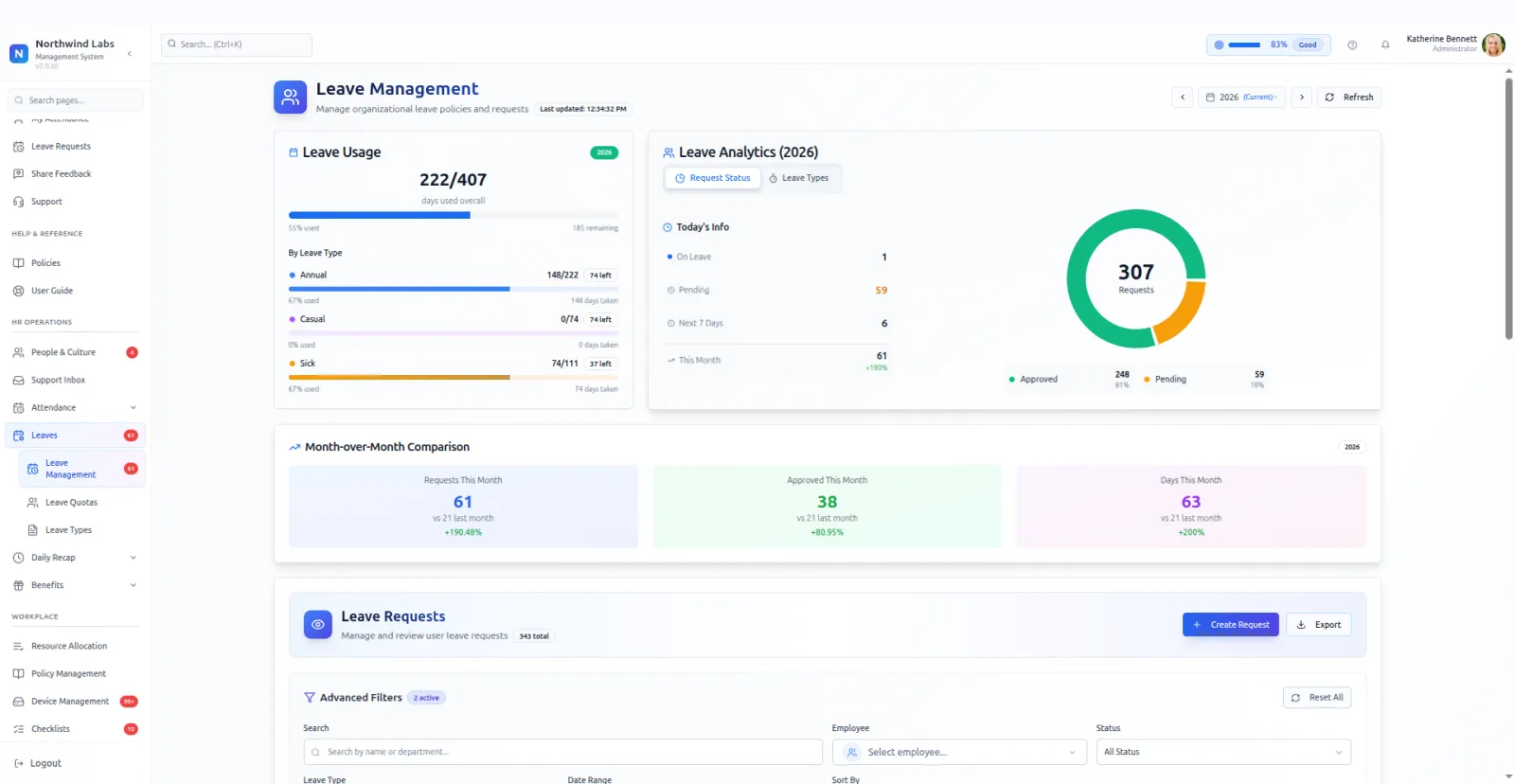
The analytics answer the questions managers actually ask. Who is off today. What is pending. Who is out in the next seven days. How this month compares with last. A funnel shows approved against rejected against still waiting, with percentages.
The quota grid is the admin view worth knowing about: every employee down one axis, every type across the other, used and allocated in each cell. Somebody who has burned their casual days in February shows up immediately.
Employees get their own version of the same arithmetic. Days used, days allocated, days remaining, and a percentage, shown overall and split by type. A year selector sits above it, so last year is one click away when a question comes up.
Encashable is a flag on the type, and it exists because some companies pay out unused days and most do not. Setting it on the type keeps the rule attached to the thing it governs instead of living in a spreadsheet somebody maintains privately.
Filters on the admin side cover employee, status, type and date range, with quick filters for pending and approved. Export takes whatever is on screen, which is the fastest route when finance asks a question the reports were not built for.
What it does
- Types you define
- Annual, casual, sick, unpaid, marriage, parental. Each with its own yearly quota.
- Paid and encashable flags
- Two switches on the type itself, so the rule lives with the thing it governs.
- Approval queue
- Pending first, with filters by employee, type, status and date range. Export whatever is on screen.
- The quota grid
- Employee by type, used against allocated in every cell, with an average usage figure across the company.
- Month-over-month view
- This month against last, so a spike is visible before it becomes a staffing problem.
What it needs before it works
- Your leave types written down with a day count each, including the ones people take without asking.
- Approvers named, so a request has somewhere to go.
- A decision on which types are paid and which can be encashed, because both flags sit on the type.
Questions people ask
What does a leave management system track?
Requests, approvals and balances. PeopleMuster shows days used, allocated and remaining for each person, overall and by leave type. Admins also see who is off today, what is pending, and who is out in the next seven days.
Why is working from home a leave type?
Because it is requested, approved and counted against a yearly number, exactly like leave. Modelling it that way gives a WFH day the same paper trail as any other day off the floor.
Can a leave type be unpaid?
Yes. Paid is a flag on the type, so an unpaid type sits alongside the paid ones with its own quota and the same approval path.
Who approves a request?
Whoever holds the permission. Requesting leave for yourself is part of the baseline every account has, while approving somebody else's is granted through a role.
Can I see last year's usage?
Yes. A year selector sits on both the employee and admin views, so a previous year's allocations and usage open without an export.