Employee directory software with codes and reporting lines
Employee directory software keeps one current record of everyone in the company: their role, their team and who they report to. PeopleMuster's directory answers the question nobody wants to ask in a group chat. Who is this person, what do they do, and who is their manager?
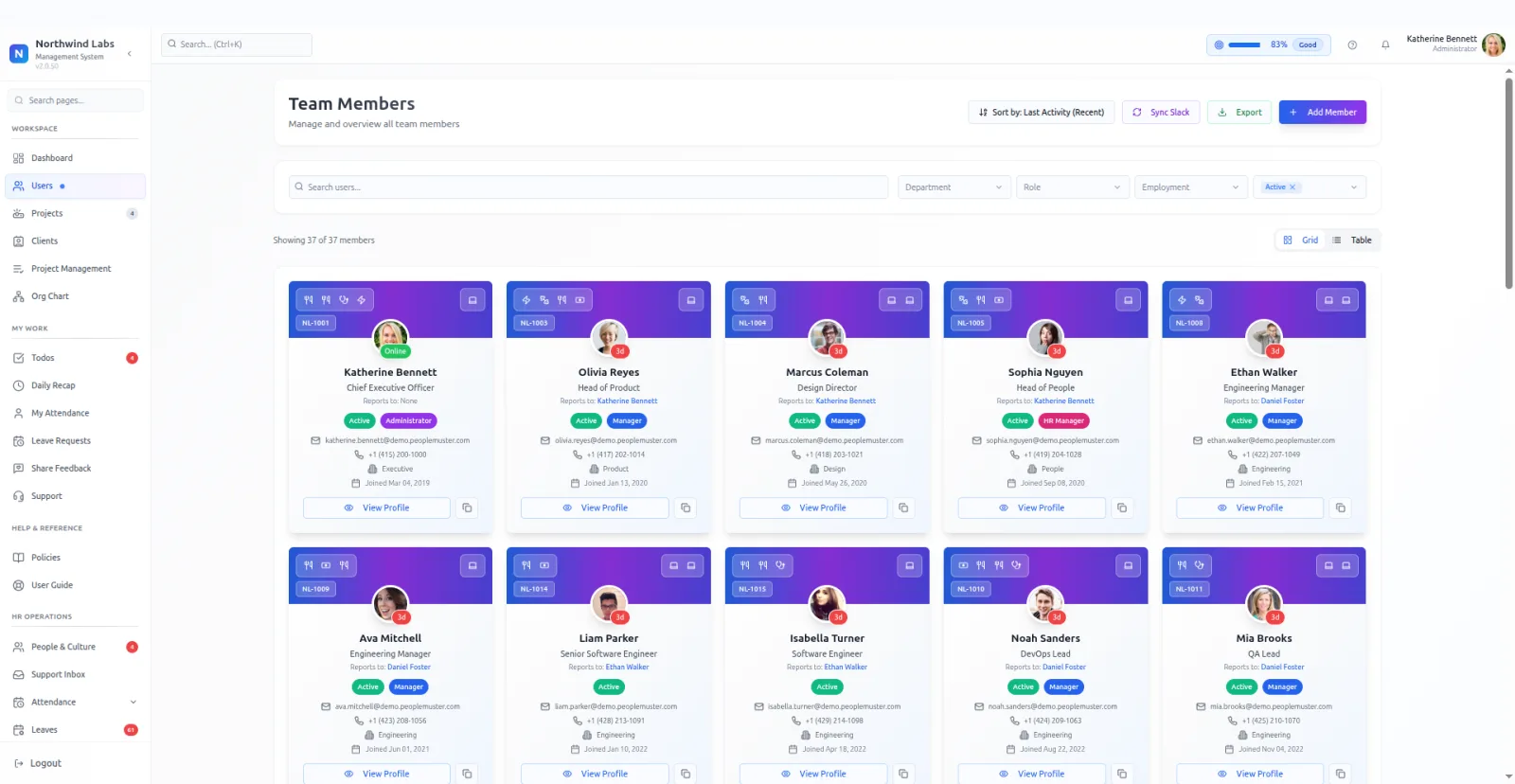
Each card carries the essentials. Name, employee code, job title, department, who they report to, when they joined, and whether their account is active.
Two views cover two habits. A grid for browsing faces, a table for scanning a department in one screen. Filters narrow by department, role, employment type and active status, and the list can be sorted by most recent activity.
Presence shows as a short last-seen marker rather than a green dot promising availability. Online, or three hours ago, so you know exactly how fresh the signal is.
Slack sync pulls profiles across from the workspace, so the two lists agree without anybody retyping names. Export is there for the times a spreadsheet is genuinely the fastest answer.
Employee codes are the quiet workhorse. A short stable identifier per person means the same human can be pointed at from a device assignment, a leave record and an attendance row without anyone matching on a name that might be spelled two ways.
Each person has a profile behind the card, split into personal details, professional details, and the skills they claim. A completion score nudges people to finish it, which works better than an email asking them to.
Sorting by last activity is the filter people discover late and then use constantly. It surfaces accounts that have gone quiet, which is usually either somebody on long leave or an account that should have been closed.
Departments do more work here than they look like they do. Every grouped report in the product, from utilisation to leave analytics, reads the same field, so a person filed under the wrong department is wrong in five places at once.
Join dates power more than a card. Work anniversaries and birthdays surface as upcoming events elsewhere in the product, which only works if the dates were entered properly on the way in.
The active flag is the one to get right when somebody leaves. Marking an account inactive keeps their history intact, which is what you want, while leaving it active keeps them in filters and counts where they no longer belong.
A directory sounds like the least interesting module here. In practice it is the one everything else depends on, because a person with no department, no title and no reporting line is a hole in five other screens.
What it does
- Grid and table views
- One for browsing, one for scanning a whole department at once.
- Employee codes
- Each person carries a short code that stays stable across the rest of the product.
- Last-seen presence
- Online, or a simple hours-ago marker drawn from each person's last activity.
- Slack profile sync
- Pull people across from your workspace rather than entering them twice.
- Filter and export
- Department, role, employment type and active state, then out to CSV.
What it needs before it works
- People created with a department and a title. An empty department turns every filter into noise.
- The reports-to field filled in, since it feeds both the directory card and the org chart.
- Slack connected, if you would rather sync profiles than type them.
Questions people ask
What should employee directory software include?
A name, title, department and manager for everyone, kept current. PeopleMuster adds an employee code, a join date and a last-seen marker to each card. You can filter by department, role, employment type and active status, then export to CSV.
Can employees update their own profile?
Yes, for their own basics. Editing your own profile is part of the baseline everyone has, and it cannot be taken away by a role setting.
Where does the reporting line come from?
From the reports-to field on each person. The same field draws the org chart, so filling it in once serves both screens.
What is an employee code used for?
A short stable identifier per person. Records elsewhere in the product point at it rather than at a name, which avoids the usual problems with spellings and duplicates.
Why does the department field matter so much?
Because every grouped report reads it. Utilisation by department, leave analytics, attendance filters. One person filed wrongly shows up wrongly in all of them.